Rajveer Singh✕
Client Project · Under NDA

Workforce
Onboarding
Platform

In active developmentAngular 22 · PrimeNG.NET microservicesClient name withheld
Introduction

A workforce lifecycle platform for a public-sector client that brings contracted staff on board — from the moment a project manager requests a new hire, through security clearance and approvals, to the day the laptop, account, badge and desk are all in place and the person is ready to start.

Before it, that process lived in forms, email threads and spreadsheets. Now every step has an owner, every owner has a task list, and nothing depends on someone remembering to forward an email. Clearances and assignments nearing expiry surface on the dashboard, so extensions are raised before anything lapses.

I built the Angular client end to end — every screen, the role model, the candidate portal and the workflow configuration UI — and contributed services to the team's .NET microservices backend, including the mail service and the onboarding APIs.

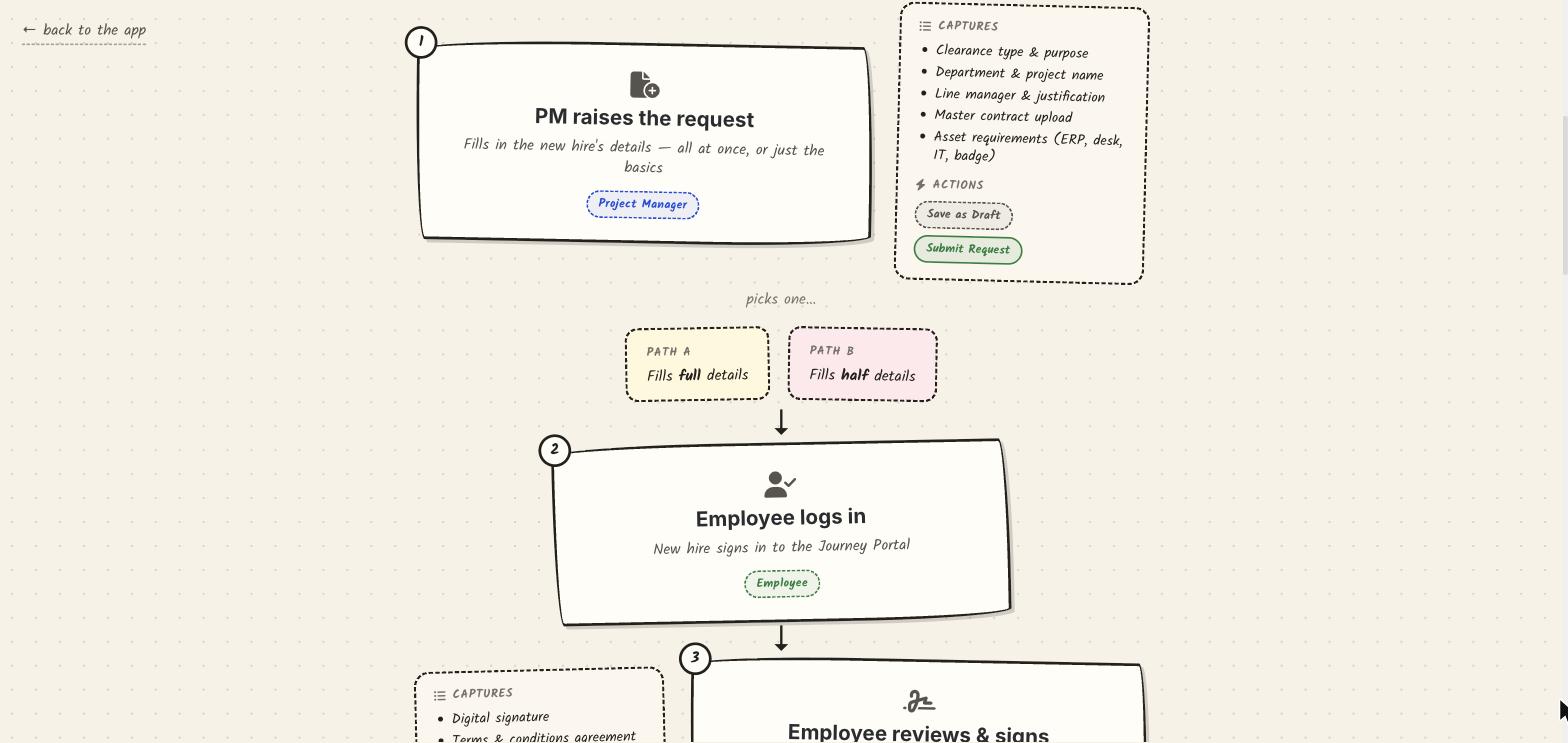
Hand-drawn style map of the onboarding journey: request raised, full or partial details, new hire signs in
The journey map built into the app — every box opens the real screen. Client branding, names and data have been removed from all screens on this page.
29K
Lines in the Client
38
Components
6
Journey Steps
6
Roles incl. New Hire
12
Backend Services

From Request
to Ready

01
Project Manager Raises the Request
Clearance type and purpose, department and project, line manager and justification, the master contract, and the assets the hire will need — saved as a draft or submitted.
02
Full or Partial Details
The manager either completes everything up front or supplies the basics and hands the rest to the new hire — both paths rejoin the same flow further down.
03
The New Hire Signs In
A dedicated candidate portal with its own login, separate from the staff application, where the new hire picks up their part of the request.
04
Review, Sign & Complete
A digital signature and terms agreement, then a multi-section wizard for personal, contact, identity, education and document details, reviewed before it's sent on.
05
Security Clearance
The onboarding specialist records the clearance decision — cleared or rejected — with an end date and remarks that drive expiry monitoring later.
06
Tasks Fan Out by Role
Laptop and serial number, directory account and corporate email, access badge, desk, orientation — each generated for IT, HR or the line manager from what was requested.
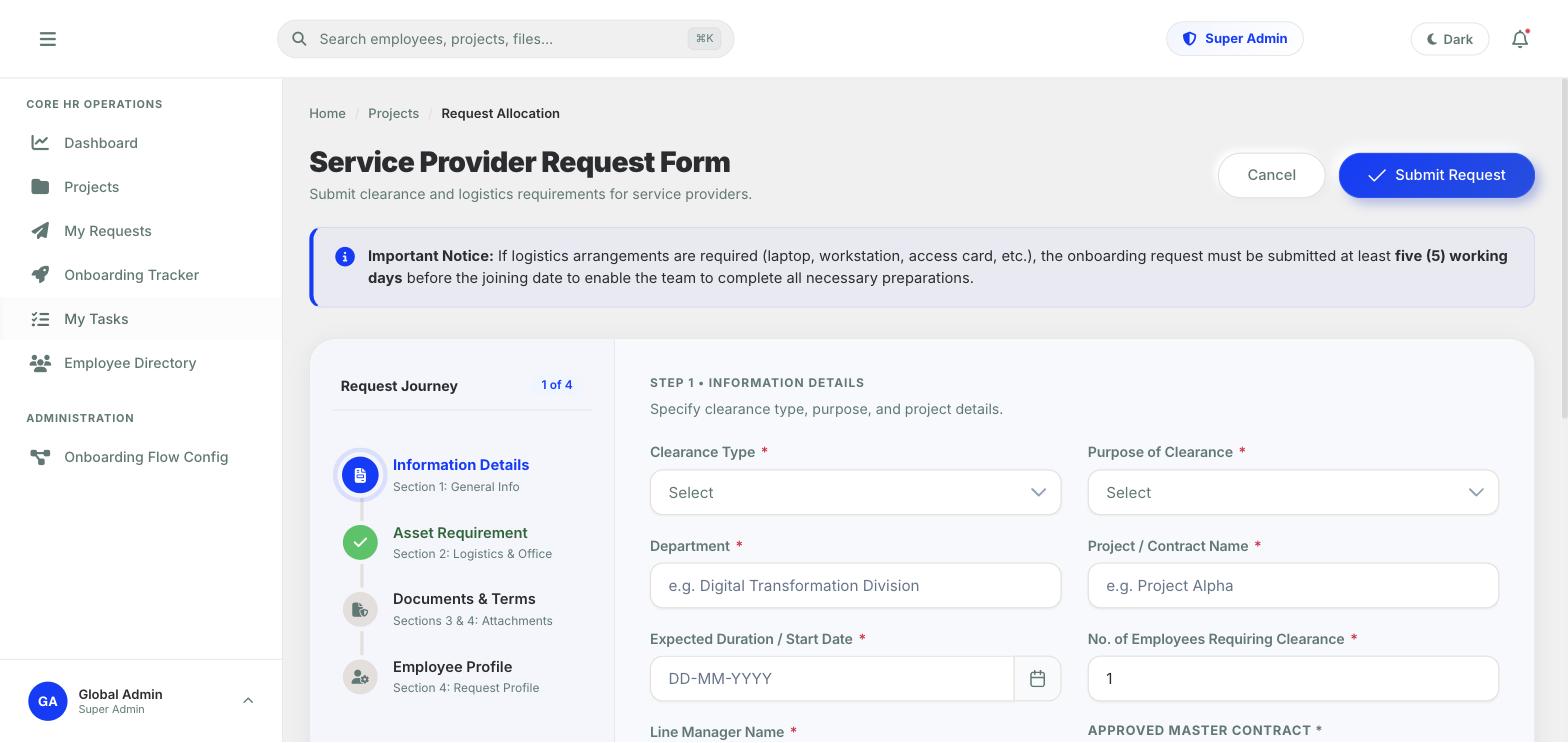
Service provider request form — a four-step journey with information details, asset requirement, documents and employee profile
Step one of the request journey — a stepper rail, sectioned fields and a lead-time notice so logistics are never requested too late.

What I
Built

01
Service Provider Requests
A four-step request journey — information, asset requirements, documents and terms, employee profile — with inline validation and a draft state.
02
Onboarding Tracker
Every onboarding in flight with its current step, owner and outstanding tasks, so HR can see exactly where each new hire is stuck.
03
My Tasks
One inbox for every role's approvals, verifications and checklist items, filtered to the active role, with pending / completed / all views and counters.
04
Asset Allocation
A dynamic allocation dialog on the IT step captures device model, serial number and assignment — the provisioning record that follows the employee.
05
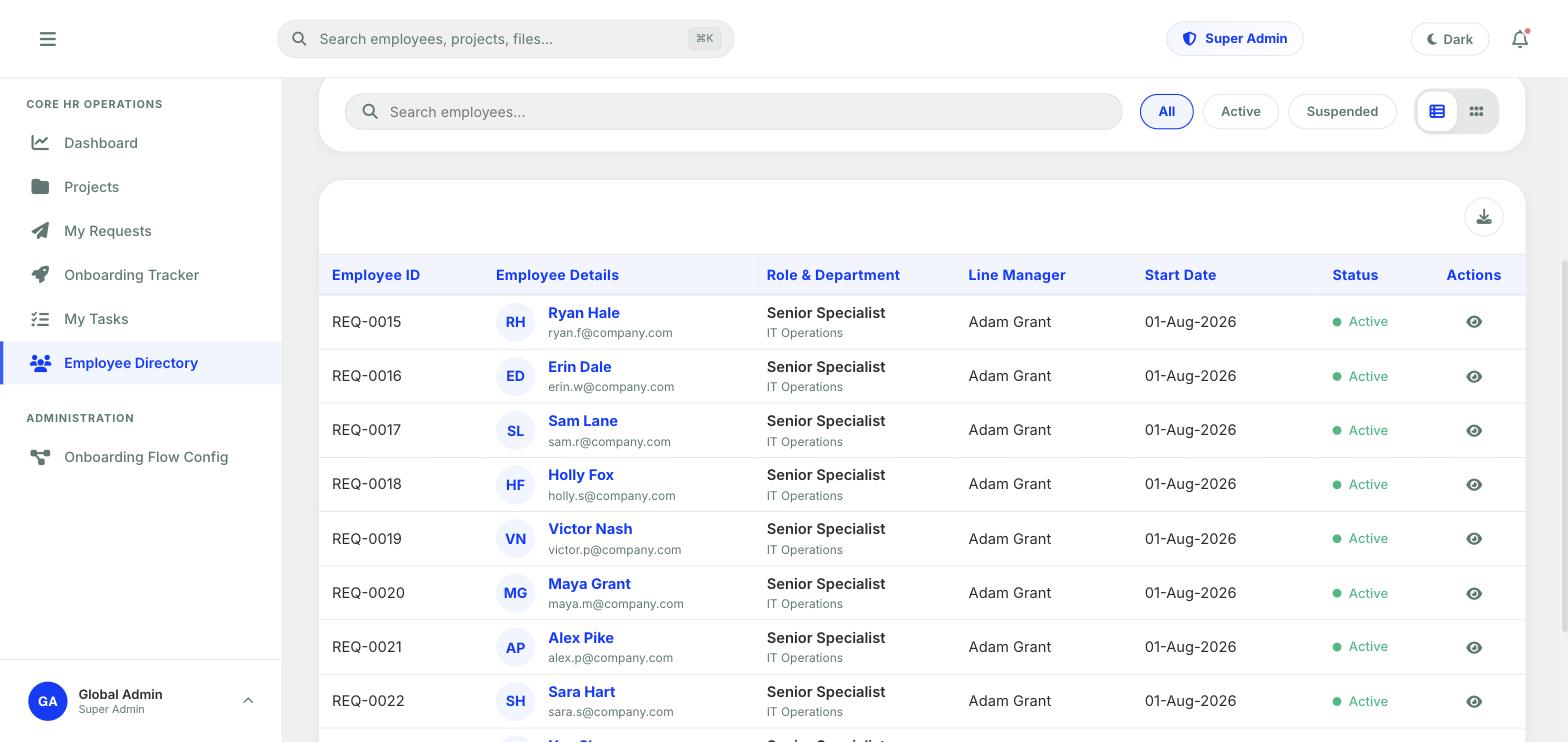
Employee Directory
Searchable roster with active and suspended filters, table and grid views, line managers, start dates and a spreadsheet export.
06
Flow Configuration
An administrator screen to define steps, actors and outcomes of the onboarding flow, and activate a new version without a release.
Employee directory table with IDs, names, roles, line managers, start dates and status
The employee directory — search, status filters, table and grid views, and export.

A Flow You
Configure

Workflow

The client asked for approvals that could be either role-based or follow the reporting hierarchy, and onboarding forms whose options decide which tasks fire. Hard-coding that would have meant a release every time a policy changed — so the flow is modelled as versioned data that an administrator edits and activates.

workflow-config-api.service.ts
// workflow-config-api.service.ts — an onboarding flow is data, not code.
type StepType = "FormEntry" | "Approval" | "TaskTrigger" | "Auto";
type ActorRuleType = "RoleQueue" | "SpecificUser" | "DynamicRelation" | "System";

interface WorkflowStepDefinition {
  stepKey: string;
  sequence: number;
  stepType: StepType;          // form to fill, decision to make, checklist to fan out
  formKey?: string | null;     // which configured form this step renders
  actorRuleType: ActorRuleType;
  actorRoleCode?: string | null;
  isMandatory: boolean;
}

interface WorkflowTransition {
  fromStepDefinitionId: number;
  actionCode: string;                    // e.g. "APPROVE", "REJECT", "CLEARED"
  toStepDefinitionId?: number | null;    // null ends the flow
}

// Definitions are versioned — admins draft a new version, then activate it.

Hard Problems
I Solved

Challenge 01

Approvals That Follow Roles or the Org Chart

The Problem: Some decisions belong to whoever holds a role — any onboarding specialist can clear a candidate. Others belong to a specific relationship — the requester's own line manager. A single hard-coded approval chain can express one of those, not both.

My Solution: Each step names how its actor is resolved: a role queue, a specific user, a dynamic relation such as “the requester's manager”, or the system itself. Steps are typed — form entry, approval with branching outcomes, task trigger, or automatic — and transitions map an action code to the next step. The configuration screen edits a draft version, and activating it makes it the live flow.

Challenge 02

Tasks Generated From What Was Actually Requested

The Problem: Not every hire needs a laptop, an ERP account or a desk. A fixed checklist either creates noise for IT and facilities, or misses the thing that was needed — and nobody finds out until day one.

My Solution: The asset section of the request is structured data, and the task-trigger step fans it out into role-owned tasks only for what was selected — equipment to IT, accounts and badges to their owners, orientation to HR. Every task owner works from one My Tasks inbox scoped to their active role, and the IT step opens an allocation dialog that records the device and serial number against the employee.

Challenge 03

A Portal for People Who Don't Work Here Yet

The Problem: Half the information has to come from the new hire — who has no staff account and shouldn't see the internal application.

My Solution: A separate candidate portal outside the staff route guards, with its own sign-in, a review-and-sign step for the terms, and a sectioned information wizard that saves as it goes. The project manager chooses up front whether to supply full or partial details, and both paths converge before security clearance, so the rest of the flow never needs to know which one was taken.

Challenge 04

Email That Arrives Even When One Channel Fails

The Problem: The whole process runs on people being told it's their turn. A notification that silently fails stalls an onboarding for days, and a single sending method is a single point of failure.

My Solution: I built a standalone mail microservice behind the API gateway. It sends through Microsoft Graph using an OAuth client-credentials token first, falls back to authenticated Office 365 SMTP if Graph is unavailable, logs every attempt and failure path, and renders branded HTML onboarding templates. Containerised and registered in the service composition, with a test-mail dialog in the client so admins can verify delivery without raising a real request.

Every Role,
One Journey

Project ManagerLine ManagerOnboarding SpecialistIT SupportHR AdminGlobal AdminNew Hire (Candidate)

Architecture
& Stack

Client
Angular 22 — standalone, signals, OnPush
Built end to end: every screen, route and guard
UI kit
PrimeNG, PrimeIcons, custom form-control library
Shared inputs, dropdowns, pickers, tabs, data table
Access
Role & permission config, route guards
Menus, routes and actions resolved per active role
Reporting
Chart.js, SheetJS, FileSaver
Dashboard KPIs and spreadsheet export
Backend
.NET microservices, Clean Architecture, MediatR
Twelve services behind a YARP API gateway (team-built)
Data & messaging
EF Core, SQL Server, RabbitMQ
Service-owned data with an event bus between services
Security
JWT bearer auth, BCrypt, FluentValidation
Token-based identity service and validated commands
My services
Mail service, onboarding APIs, lookup endpoints
Graph + SMTP fallback, Dockerised, gateway-routed
Delivery
Docker Compose, Serilog
Composed services with structured logging
Role
Front-end lead — Angular client; backend contributor
Author
Rajveer Singh
Client
Public sector — name withheld under NDA
Type
Workforce onboarding & lifecycle management
Frontend
Angular 22, PrimeNG, Chart.js, SheetJS
Backend
.NET, EF Core, SQL Server, RabbitMQ, YARP (with the backend team)
Integrations
Microsoft Graph, Office 365 SMTP
Status
In active development — 2026